
Turn an old iMac into a clock.
Or a smart display.
The simplest way is a full-screen app that runs on the macOS your iMac has. Encore does this out of the box: when you stop using it as a second screen, the iMac shows StandBy with clock faces, weather and your calendar, and it can play AirPlay music with lyrics. Other routes exist: a browser dashboard such as DAKboard, or a screen saver clock. Check the power cost before leaving it on all day.
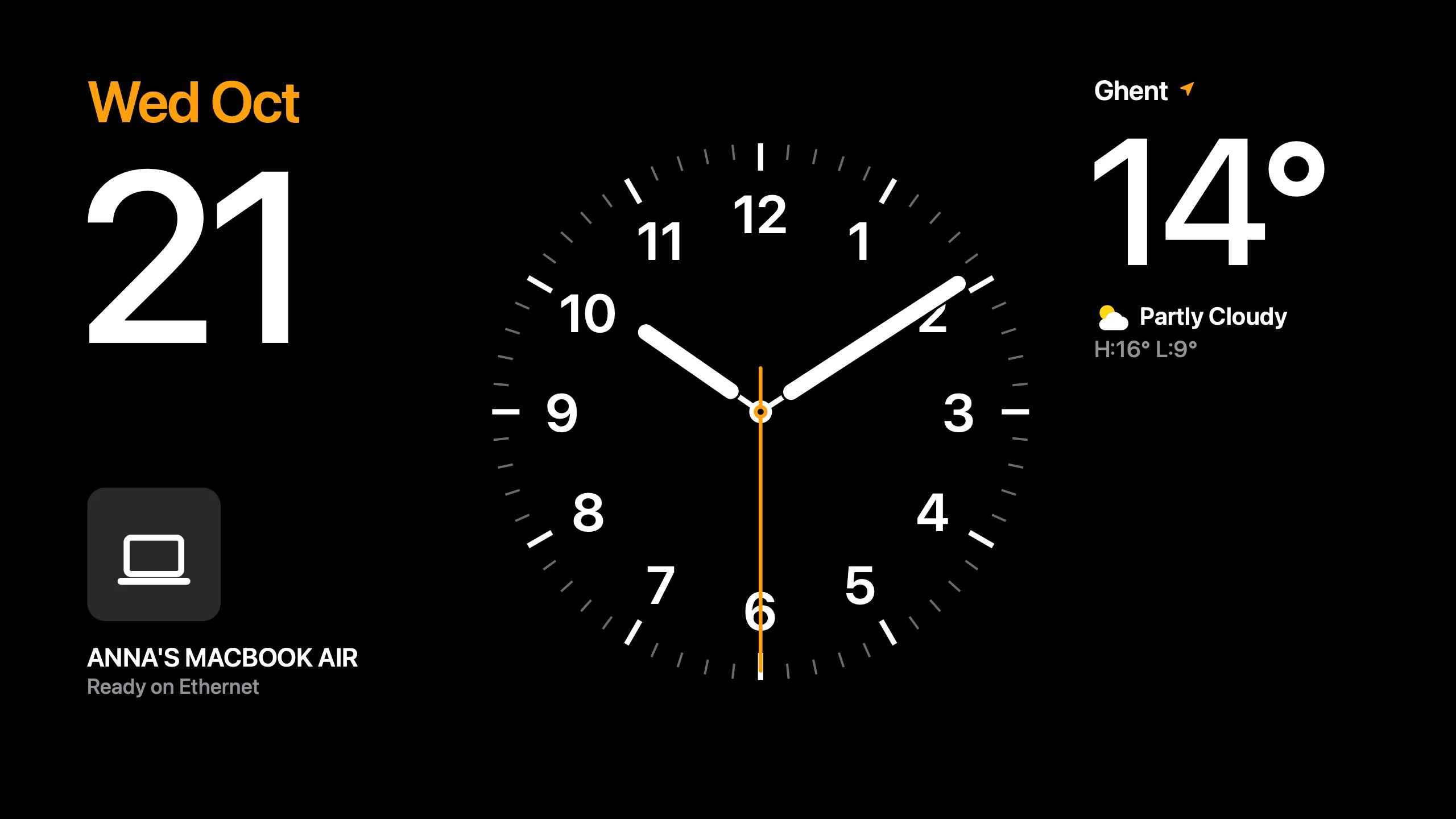
Option 1: Encore's StandBy
Encore turns your iMac into a second screen while you work and a smart display when you stop. The app on the iMac runs StandBy on its own. It shows:
- Clock faces in many styles.
- Weather and your calendar.
- HomeView, a home screen with cards.
- Now Playing: while no Mac uses the iMac, it acts as an AirPlay speaker. Play from Spotify, YouTube or Music and it shows the cover on a spinning record, with lyrics in time when they exist.
- Hey Mac: ask a question out loud and the iMac answers in large type and speaks it, using your own AI key. Listening is off until you turn it on, and the wake word and your question are recognised on the iMac itself.
It runs on every Intel iMac from Late 2009 to 2020 on macOS 10.13 or later. You pick the face on your Mac; StandBy runs on the iMac itself. With no Mac connected, the iMac's screen turns off after 15 seconds by default. If you want the clock to stay on without your Mac, set Screen off without a Mac to Never in Encore's StandBy settings. Check your iMac.
Option 2: a browser dashboard
Any iMac that still runs a usable browser can show a web dashboard in full screen. DAKboard has a free plan with one predefined screen and up to two calendars; paid plans start at $5 a month billed annually. Its free refresh rates are slow: photos change every two minutes and calendars every hour, which is fine for a wall screen. Tom's Guide describes setting one up on an old monitor. If your iMac's browser no longer runs modern sites, this route may not work.
MagicMirror² is built for Raspberry Pi, with other systems through alternative installation methods. It is a project rather than an app.
Option 3: a clock app or screen saver
- Stand Clock Display is a Mac App Store app with an always-on clock. It needs macOS 10.15 or later, and the Pro version costs $0.99. So it runs on iMacs from Late 2012 on.
- Fliqlo is a free flip clock screen saver, but its current macOS version requires macOS 14, so it only runs on a 2019 or 2020 iMac unless an older version from its history still works.
- The Mac's own screen saver can show a clock. Apple's Screen Saver settings run it after the iMac sits idle, but it stops when you use the Mac.
What to run on which iMac
| iMac | Encore StandBy | Stand Clock Display | Browser dashboard |
|---|---|---|---|
| 2007 to Early 2009 | Yes, with Encore Receiver Legacy (OS X 10.10 or 10.11), at a smaller picture | No | Depends on the browser |
| Late 2009 to 2011 | Yes | No (macOS 10.13 is the limit) | Depends on the browser |
| Late 2012 and later | Yes | Yes | Yes, in most cases |
We have not tested every browser on every macOS version. Check the newest macOS for your iMac on the compatibility page.
The power cost
An iMac is not a tablet. Apple's power figures give an idle draw, measured from the wall with Finder open, of 145 W for a 27-inch Late 2009 and 135 to 142 W for a Mid 2011 model, and much lower on newer ones: 63 W for a Late 2015 5K, 71 W for a 2019 5K, 33 W for a 21.5-inch 2017.
A 135 W iMac on all day uses about 1,180 kWh a year, about €355 at €0.30 per kWh. A 33 W iMac uses about 290 kWh, about €87. If you only need it in the morning and evening, use a schedule or a smart plug. In a MacRumors thread on exactly this, a member estimated about $73 a year for one iMac, and others pointed out that an old iPad does the same job with far less power. That is a fair point. If you own a spare iPad, it is a good alternative.
Will the screen burn in?
The iMac has an LCD panel, not an OLED. Apple's OLED guidance for iPad Pro describes image persistence on OLED; we found no equivalent note about iMac LCDs, and no reliable data on LCD burn-in under a static clock. Reasonable precautions: change faces now and then, and let the screen go dark when nobody is around. Encore's Screen off without a Mac setting does that automatically (15 seconds, 1 minute, 5 minutes or never), and the iMac stays ready for your Mac while the screen is off.
Setup with Encore
- Install Encore Receiver on the iMac and Encore on your Mac (install guide).
- Pair them with the code shown on the iMac.
- Pick a face in Encore on your Mac. StandBy runs on the iMac itself from then on. Set Screen off without a Mac to Never if the clock should stay on without your Mac nearby.
- For music, AirPlay to the iMac from your iPhone or Mac.
It is the same app you can use as a second screen when you need one, so you don't have to pick. Compare the alternatives, or see the help center if something doesn't work.
Questions
Can I use my old iMac as a clock?
Yes. Encore shows StandBy clock faces on any Intel iMac from Late 2009 to 2020. Stand Clock Display works on macOS 10.15 or later, and a browser dashboard works if your iMac's browser is new enough.
Does Encore need my Mac on to show StandBy?
StandBy runs on the iMac itself. You pick the face on your Mac. With no Mac connected the screen turns off after 15 seconds by default; set Screen off without a Mac to Never to keep the clock on.
How much power does an iMac use as a clock?
Apple's idle figures are about 135 to 145 W for a 27-inch 2009 to 2011 model and 33 to 74 W for newer models. Left on all day a 135 W iMac costs about €355 a year at €0.30 per kWh.
Will a clock burn into the iMac's LCD screen?
We found no reliable data for iMac LCDs. Changing the face now and then and letting the screen sleep when nobody is around are reasonable precautions.