We strongly recommend a cable for the best performance. Encore needs at least 400 Mbps between your Mac and the iMac.Best over a cable, 400 Mbps or more. Find your cable →

Changelog.
What changed, version by version.

Both apps update themselves from version 0.5.0 on. The newest version is 0.8.5.

0.8.5Mac

The panel from the notch, every time

A small release: the menu bar panel opens reliably, and connections start on the cable.

Improved

  • Panel from the notch. Move the pointer up under the notch, or scroll up at the top edge, and the panel drops down, also while the Encore window is in front.
  • Connecting. While an iMac connects, the panel drops down by itself for the connect moment and lifts again after the check.
  • Cable first. Every new connection starts on the cable when there is one. Choosing Wi‑Fi lasts until you disconnect.
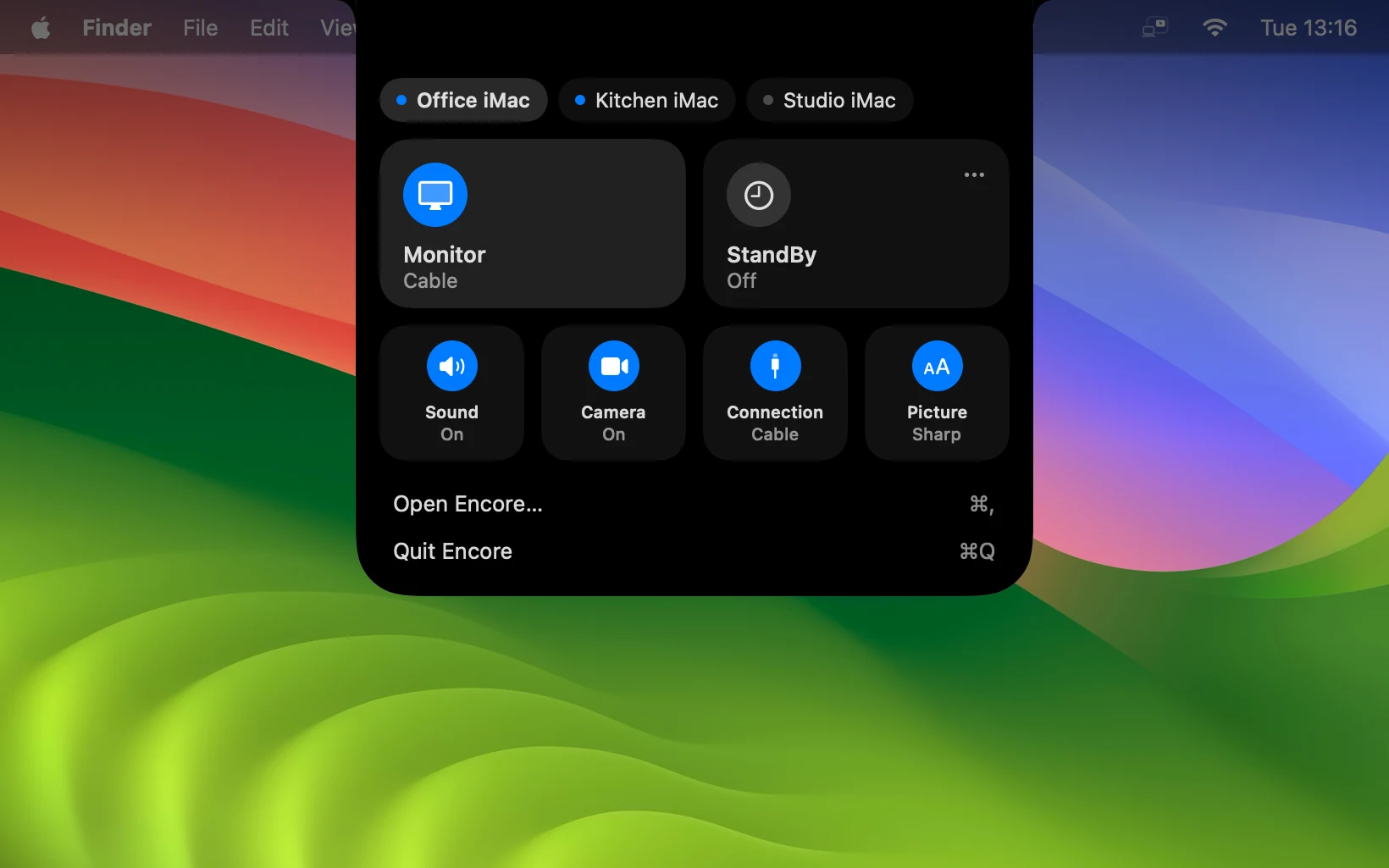
The Encore panel, dropped down from the notch: Monitor, StandBy, sound, camera, connection and picture.
The panel under the notch.
0.8.4Mac and iMac

Smoother over a cable, and a new home for every iMac

A calm new window and a panel that drops from the notch. Over a cable everything runs on the cable from the first frame, and your iMac can answer when you say Hey Mac.

New

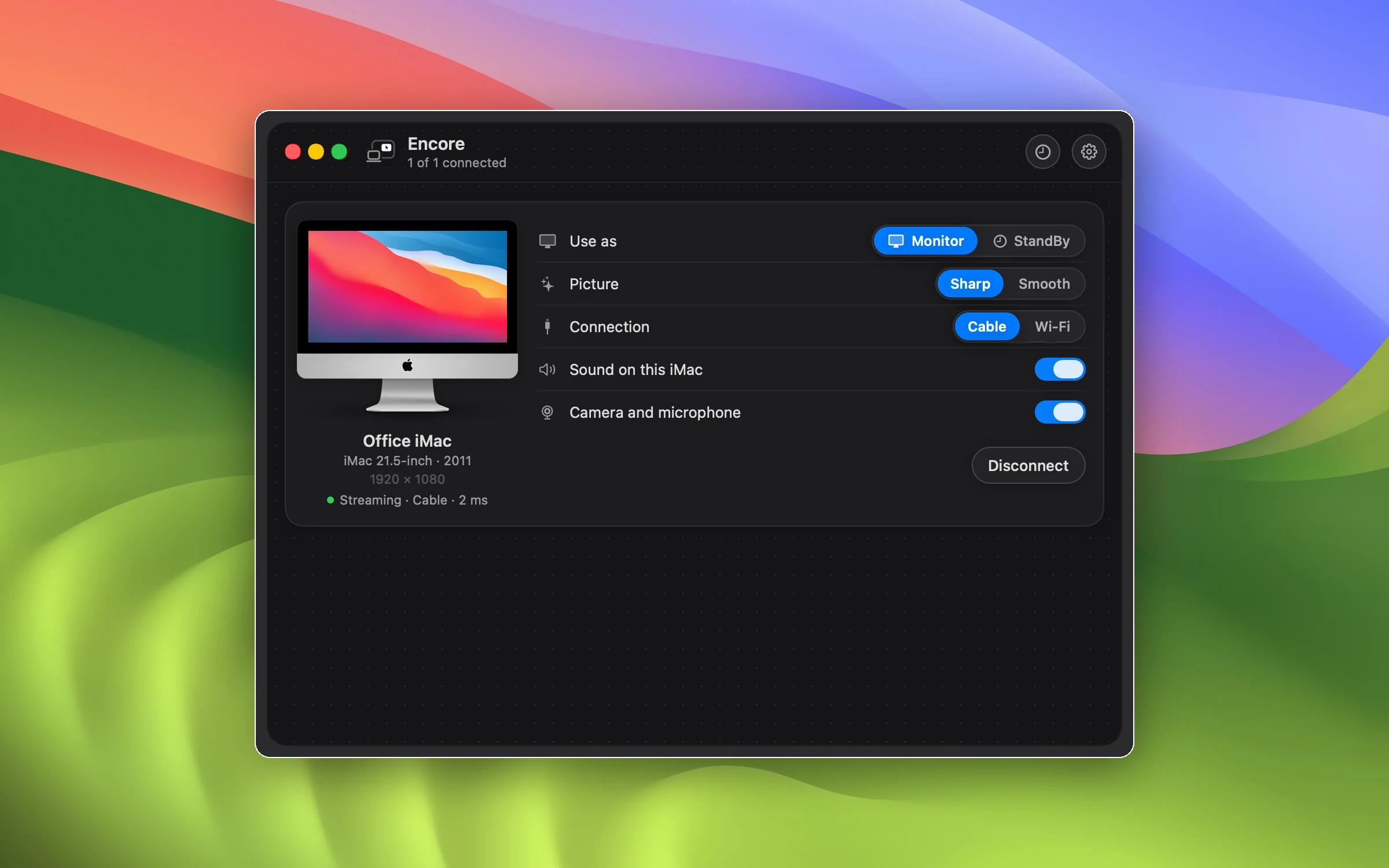
  • A new window. Every iMac shown as the real model it is, with what it shows on its screen and all its controls next to it. Settings and StandBy sit behind two round buttons at the top right.
  • Panel from the notch. Rest the pointer at the top edge and the panel drops down from the notch with a soft sound. Monitor or StandBy, sound, camera, cable or Wi‑Fi, and Sharp or Smooth are one click each. Press and hold StandBy to pick a clock face. You can turn the panel off in Settings.
  • The connect moment. While an iMac connects, a cloud of fine dots condenses into a check, large in the open panel and small in the menu bar.
  • Hey Mac. Add an AI key on the iMac, or once from the Mac, and ask your iMac anything while it rests in StandBy. The wake word and your question are recognised on the iMac itself; only the text of the question leaves it. Listening is off until you turn it on.
  • Volume on the iMac. Change the volume from your iPhone or Mac while it plays to the iMac, and a calm volume bar shows it on the iMac's screen.
  • Always awake for your Mac. The iMac keeps listening for your Mac, so it is there right away instead of asleep. Its screen can still go dark, and it lights up when music starts.

Fixed

  • Cable lag. Dragging windows over a cable no longer turns into blocks, the picture no longer starts on Wi‑Fi, and the bitrate follows what your cable can carry.
  • Wi‑Fi sharpness. After a short hiccup the picture climbs back to full quality within a drag instead of staying blocky.
  • Stability. Still tiles that never arrived on slow cables, a frozen picture after a decoder error, and the reply path switching back and forth next to a cable.
  • Menu bar panel. The panel opens at its full height and no longer flickers at the top edge.
The new Encore window: the Office iMac, a 21.5-inch from 2011, streaming as a monitor over a cable, with its controls next to it.
The new window, one iMac on a cable.
0.8.2Mac and iMac

A new Encore, with music, lyrics and a presenter screen

Encore on the Mac is rebuilt as a native Mac app. And while your iMac rests, it becomes an AirPlay speaker with a Now Playing screen.

New

  • One window. A sidebar like System Settings: Overview, every iMac on its own page, StandBy and Settings, in one window that never jumps in size.
  • Overview. Live charts for latency, frame rate and bitrate per iMac, and how long each one was connected today.
  • Menu bar panel. Click the Encore icon, or rest the pointer at the top edge above it, to connect iMacs, pick where sound plays and switch Sharp or Smooth.
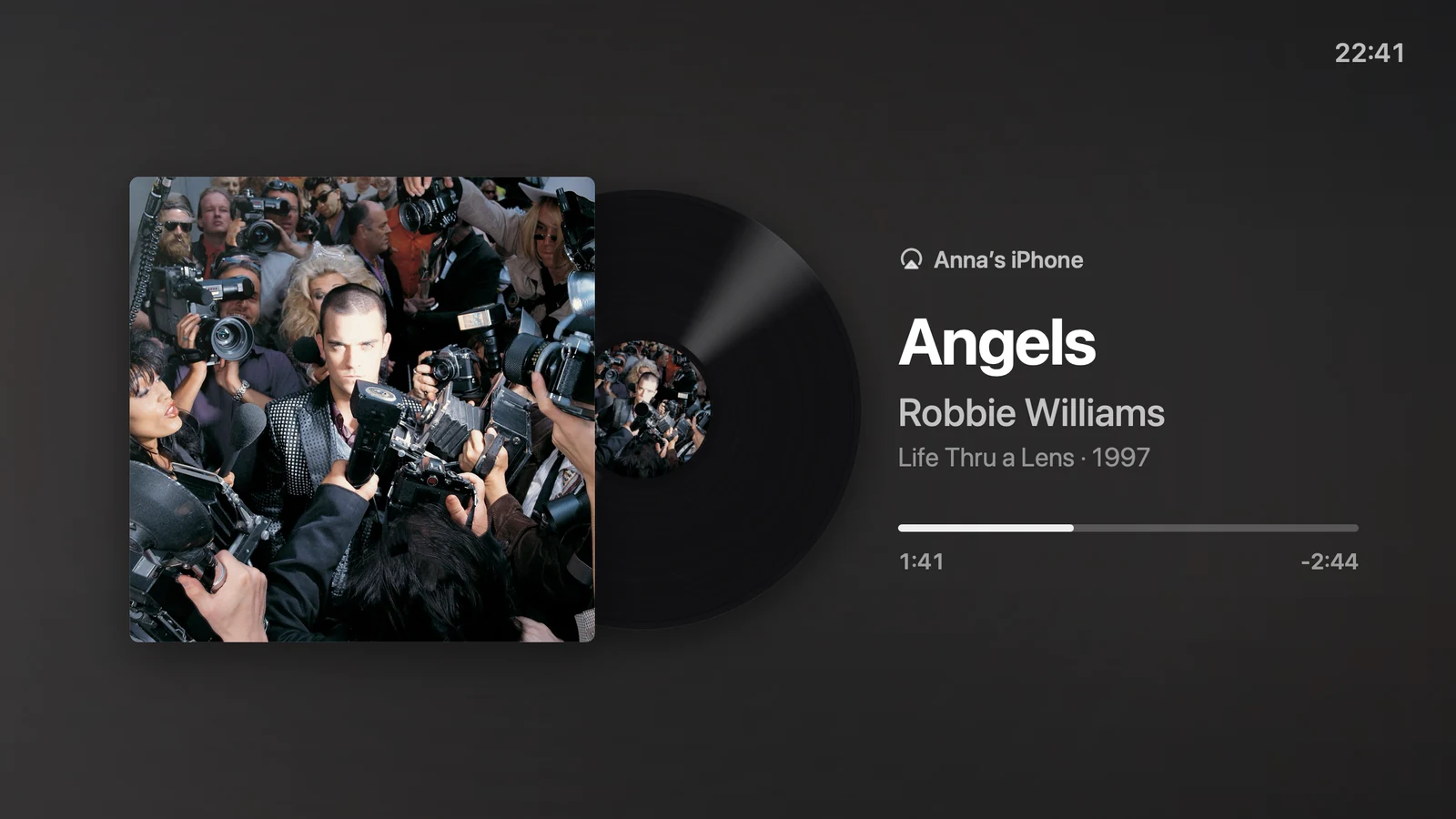
  • AirPlay on the iMac. While no Mac uses it, the iMac shows up as an AirPlay speaker. Play from Spotify, YouTube or Music and the iMac shows the cover, a spinning record and the time left.
  • Sing along. When lyrics exist, Now Playing shows them in time with the music, line by line.
  • Presenter screen. While Keynote plays on your Mac, the iMac can show your notes, the next slide and a timer. A teleprompter for video calls is there too.
  • Dark by default. Choose Automatic, Light or Dark in Settings.

Improved

  • Quit from the app. Quit Encore sits in Settings and in the menu bar panel, and ⌘Q works while the window is open.
  • Dutch everywhere. The iMac app speaks Dutch completely on a Dutch Mac, from pairing to the world clock.

Fixed

  • StandBy previews. Face previews no longer all show the night clock when they were made late in the evening.
Now Playing on the iMac: the album cover on a turning record, with the song and the time left.
Now Playing on the iMac.
0.5.8Mac and iMac

A cable always wins

Plug a cable straight from your Mac into the iMac and Encore sees it and uses it.

Improved

  • Sees a direct cable. A Mac cabled straight to the iMac, with no router in between, used to look like it only had Wi‑Fi. Encore now spots that cable and picks it.
  • Cable comes first. Connecting no longer gets stuck on Wireless. Wireless is only offered when the iMac has Wi‑Fi, and a cable the iMac starts using takes over.

Fixed

  • Check for Updates. On the iMac it always answers on screen, also outside StandBy, stays clickable while a download runs, and tells you when the app has to move to Applications first.
0.5.7iMac

Encore Receiver Legacy on OS X Yosemite

iMacs from 2007 to Early 2009 that never got past OS X 10.10 Yosemite can be a second screen too.

New

  • Runs on 10.10. Encore Receiver Legacy runs on OS X 10.10 Yosemite, not only on 10.11 El Capitan.

Improved

  • Download from our site. These older systems don't trust GitHub's download certificate, so the Legacy download comes straight from the Encore site.
0.5.6Mac and iMac

StandBy really lets go

When an iMac switches to StandBy, your windows come back to the Mac and no video is sent anymore. The sound keeps playing.

Fixed

  • Screen removed in StandBy. The iMac's screen is really removed from your Mac, so no window stays behind on a screen you can't see. Switch back to Display and the screen returns.
0.5.5iMac

Encore Receiver Legacy for 2007 to Early 2009 iMacs

A receiver for older iMacs on OS X 10.11 El Capitan, like the 20- and 24-inch aluminium iMacs.

New

  • Encore Receiver Legacy. A separate download for iMacs from 2007 to Early 2009. It updates itself, like the other apps.
  • A picture that fits. The iMac measures how much video it can decode, and your Mac sends a picture that fits.
0.5.4Mac and iMac

Safer connections and Check for Updates

Fixes from our security review before launch, and the version number with Check for Updates in the dashboard.

Security

  • Always encrypted. Keyboard and mouse only travel over an encrypted connection. There is no unencrypted fallback anymore, and an attempt to weaken the connection is refused.
  • Safer pairing. Pairing without a code is refused, the pairing file is only readable by you, and the iMac checks every StandBy photo and face it receives.

Improved

  • Version and Check for Updates. Both sit at the bottom of the dashboard on your Mac.
  • Only a screen. Turning it off gives the iMac its screen saver settings back.
0.5.3Mac and iMac

Widgets in StandBy

StandBy on the iMac shows widgets with real data, in six layouts. And the dashboard on your Mac scrolls.

New

  • Six widget layouts. Forecast by the hour and the day, sunrise and sunset, your photos, and from your Mac: Now Playing, batteries and your calendar. Only real data, never placeholders.
  • Pick them on your Mac. The layouts sit next to the faces in the StandBy panel. Your Mac only sends its widgets while an iMac shows them, and asks for calendar access only when you switch the calendar on.

Fixed

  • Dashboard. The dashboard on your Mac scrolls and fits the screen, so no button is out of reach.
0.5.2Mac

Smoother with two iMacs on one Wi‑Fi

Two iMacs on the same Wi‑Fi share it fairly, busy pictures stop dropping frames, and the cursor stays smooth.

Improved

  • Fair Wi‑Fi. Two iMacs on one Wi‑Fi share what the network can really carry, measured as you go, instead of a fixed amount each.
  • No dropped frames. Screens take turns on your Mac's video engine, so busy pictures no longer drop frames.
  • Smooth cursor. The cursor stays smooth on Wi‑Fi that hiccups.
  • Cable tip. When two iMacs share the Wi‑Fi, the dashboard suggests a cable for the busiest one.
0.5.1Mac and iMac

Pair by typing a code

The iMac shows a code when your Mac asks for it, and you type it on the Mac.

New

  • Typed code. Pairing is one code you type on your Mac.
  • Home screen. The iMac shows a home screen with a blurred photo of the day, the time and glass tiles.
  • Notification cards. Instead of a disconnected screen, the iMac shows a small card: connection lost, reconnected, asleep, paired, sound, keyboard and mouse, updated.

Improved

  • Stays unlocked. When the iMac is only a screen, its screen saver stays off and it no longer asks for a password after sleep.
0.5.0Mac and iMac

StandBy, several iMacs and updates that install themselves

From this version on, both apps update themselves. When the iMac isn't a screen, it shows a clock, the weather and your calendar.

New

  • StandBy. Twelve faces with the time, weather and calendar. Pick one on your Mac, and switch a connected iMac between Display and StandBy without disconnecting.
  • Automatic updates. Encore and Encore Receiver update themselves. On the iMac the update installs quietly.
  • Several iMacs at once. Each iMac gets its own Connect button, Wireless or Cable choice and signal meter.
  • Keyboard and mouse. Control your Mac with the keyboard and mouse plugged into the iMac.
  • Sound. Play your Mac's sound on one or more iMacs, all at the same moment. The volume keys on your Mac control it.

Get the latest version.

One app for your Mac, one for the iMac. Free during the public beta.