
AirPlay to an old iMac.
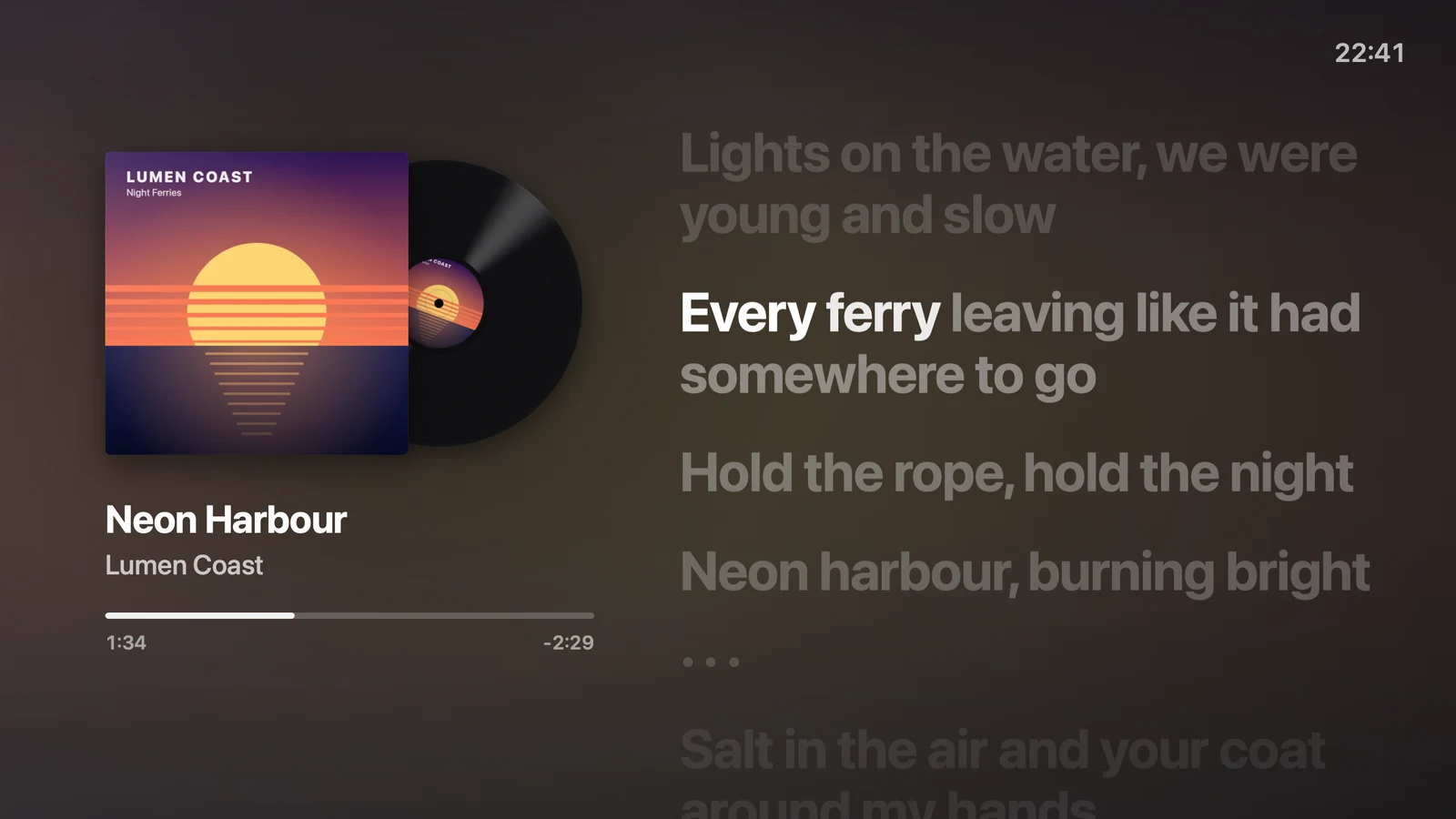
As a speaker, with the cover and lyrics.
Apple's AirPlay to Mac only works on Macs from 2018 or later, on macOS Monterey or later. For iMacs, that means 2019 and 2020. An older Intel iMac on macOS 10.13 or later can still play AirPlay music with Encore Receiver, with the cover and lyrics on screen. It plays sound only, not video.
Can an old iMac be an AirPlay receiver?
Not with Apple's own feature. Apple's Continuity requirements list three kinds of Mac for AirPlay to Mac. They are the iMac Pro, a Mac mini from 2020 or later, and "all other Mac models introduced in 2018 or later". Each needs macOS Monterey 12 or later.
Apple released no iMac in 2018. So for regular iMacs, the list starts at 2019. An iMac from 2017 or earlier can't receive AirPlay from Apple's side, even on a newer macOS, without unofficial patches.
The same page lists the senders. An iPhone needs to be an iPhone 7 or later, on iOS 14 or later. An iPad needs to be an iPad Pro (2nd generation) or later, on iPadOS 14 or later.
That leaves out every iMac from Late 2009 to 2017. Encore Receiver turns those into an AirPlay speaker, as long as they run macOS 10.13 or later.
How to AirPlay music to an old iMac
- Check the iMac.It needs macOS 10.13 High Sierra or later. Look up your model on the compatibility page.
- Install Encore Receiver.It is on the download page, free during the public beta.
- Leave the iMac in StandBy.No Mac may be connected to it. A Mac connected in StandBy also blocks AirPlay.
- Use the same network.Your iPhone, iPad or Mac must be on the same network as the iMac.
- Pick the iMac as the speaker.Choose its name in Control Centre, Spotify, YouTube or Music. Then play.
The iMac appears under its Encore name. AirPlay is on by default. If it never shows up, the AirPlay troubleshooting steps cover the usual causes.
What does the iMac show while music plays?
A Now Playing screen covers the clock while music plays or is paused. The cover sits on a record that slides out and spins. Next to it: the title, artist, album and a time bar.
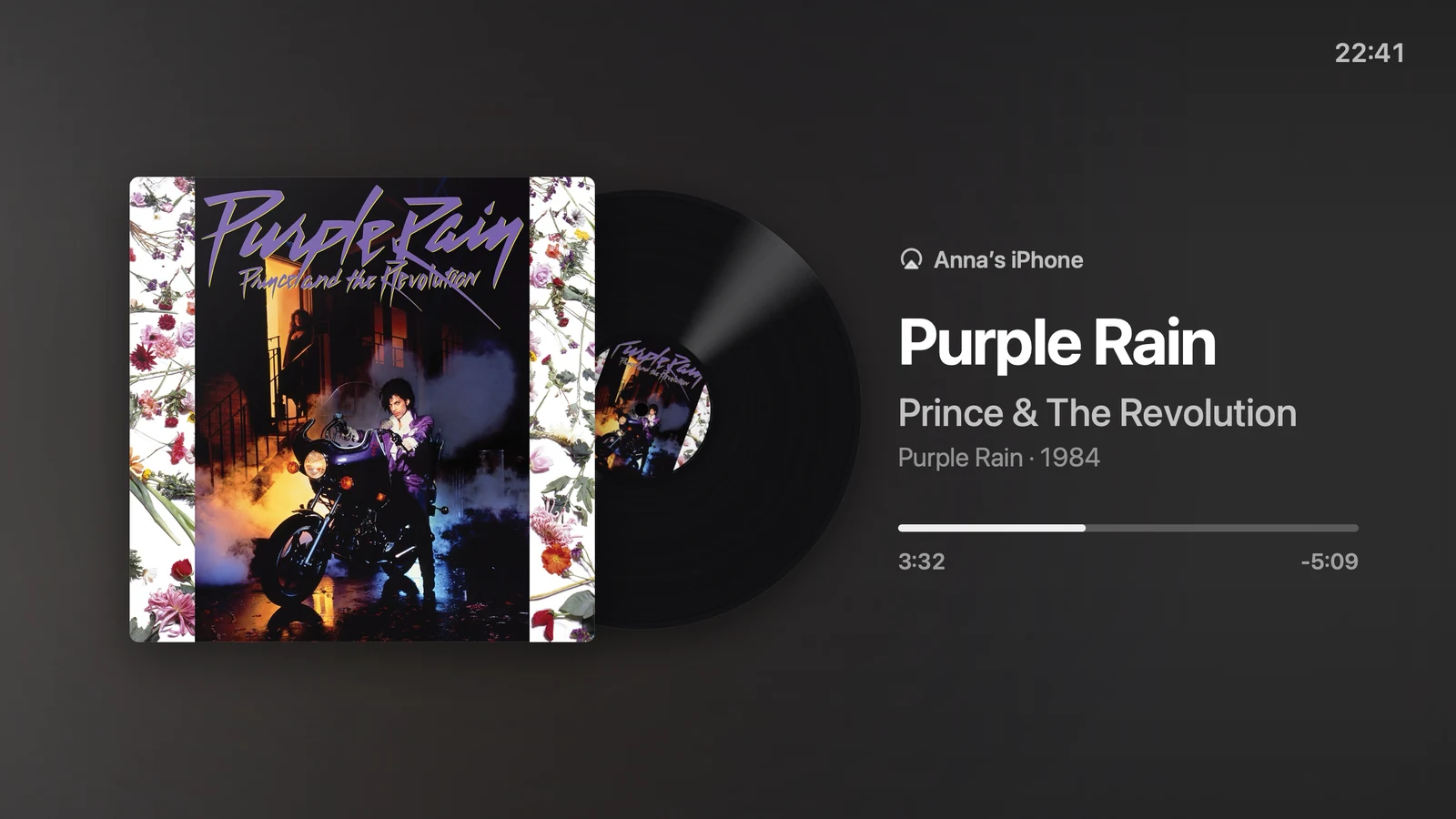
- Pause and the record slides back into the sleeve. The normal StandBy face returns 30 seconds after the music stops.
- Volume follows the volume you set on the phone.
- A dark screen lights up when music starts. While music plays, the screen stays on.
- At night, the night setting still dims the screen.
- The cover shows for every song since version 0.8.7. Spotify and iPhones send the next cover just before the song, and the iMac now keeps it.
Can an old iMac show song lyrics?
Yes, when the song has timed lyrics. The iMac fetches them itself from LRCLIB, a free community database that needs no account. It caches every answer on the iMac, including misses.
When the lyrics are timed per word, the words light up as they are sung. The lyrics follow what you hear from the iMac's speakers, not the progress your phone reports. Lyrics without timing are not shown. With no lyrics at all, the screen stays as it was.
Lyrics are on by default. Turn off "Show lyrics with music" in the StandBy settings if you don't want them.
Can the iMac show what my Mac is playing?
Yes, while your Mac is connected and the iMac shows StandBy. Turn on "Show this Mac's music on the iMac" in the StandBy settings. The same Now Playing screen then shows what Music or Spotify plays on your Mac.
The first time, macOS may ask if Encore may control Music or Spotify. Encore only asks at that moment. With the switch off, it reads nothing.
What AirPlay on an old iMac can't do
This is a speaker, not a second screen. Know the limits before you set it up.
- Sound only. No video and no screen mirroring. For the iMac as a monitor, Encore uses its own protocol, over Wi-Fi or a cable.
- AirPlay 1, not AirPlay 2. Encore Receiver speaks the original AirPlay protocol. It plays one stream at a time. A second sender takes over from the first.
- Not while a Mac uses the iMac. When a Mac connects, the music stops. When the Mac lets go, the iMac is an AirPlay speaker again.
- Turning it off takes one Terminal line on the iMac:
defaults write app.encore.receiver airplay -bool false, then restart Encore Receiver.
Encore is in public beta, version 0.9.1. If something sounds or looks wrong, the report page reaches the people who fix it.
AirPlay to Mac or Encore Receiver: which fits your iMac?
| AirPlay to Mac | Encore Receiver | |
|---|---|---|
| iMacs | 2019 and 2020, on macOS Monterey or later | Intel iMacs on macOS 10.13 or later |
| What it receives | Streamed or mirrored content, per Apple | Music and other sound |
| On screen | The content you send | Cover on a record, title, time, timed lyrics |
| Price | Built in | Free during the public beta |
With a 2019 or 2020 iMac, Apple's feature is already there. With an older one, Encore Receiver is the route. If you also want the iMac as a screen for your Mac, read Encore vs AirPlay to Mac. For the clock and the rest of StandBy, see turning an old iMac into a clock or smart display.
Questions
Can my old iMac receive AirPlay?
Apple's AirPlay to Mac needs a Mac from 2018 or later on macOS Monterey or later, so for iMacs that means 2019 and 2020. With Encore Receiver, an Intel iMac on macOS 10.13 or later can receive AirPlay audio.
Can I AirPlay video or mirror my screen to an old iMac with Encore?
No. Encore Receiver is an AirPlay speaker: it plays sound and shows the cover and lyrics. To use the iMac as a screen for your Mac, Encore uses its own protocol instead.
Does it work while my Mac uses the iMac as a monitor?
No. The iMac is an AirPlay speaker only while no Mac is connected to it, also not in StandBy. When a Mac connects, AirPlay stops, and it comes back when the Mac lets go.
Where do the lyrics come from?
The iMac fetches them from LRCLIB, a free community database, and caches them. Only timed lyrics are shown. If a song has none, the screen stays as it was.
Is it AirPlay 2?
No. Encore Receiver uses the original AirPlay protocol, AirPlay 1. It plays one stream at a time, and a second sender takes over from the first.
Give your old iMac a new life.
A speaker and a clock when you stop, a second screen when you work.